
Author Archives: Scott Magee

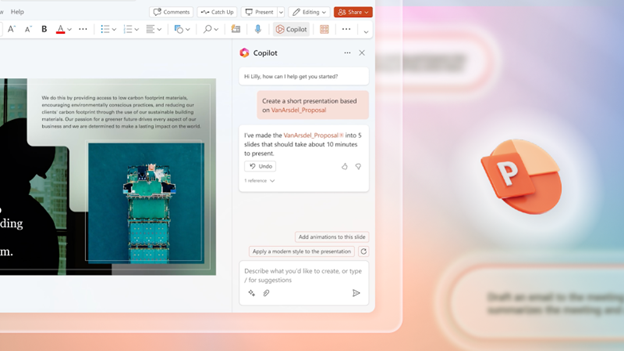
Hot off the Digital Presses… Learn About Microsoft Copilot for Finance

white laptop computer on white table

Microsoft Copilot has been heading up the business AI charge. It’s used in Word, Excel, Edge, Windows, and more. This genAI-powered app is also showing up in various function-related activities. The latest of which is finance processes.

Microsoft Copilot for Finance is a game-changer. It injects the power of next-generation AI into the heart of your everyday workflow. Imagine having an AI companion that understands the intricacies of finance as well as collaborates seamlessly with you.

It can help a seasoned financial analyst or a curious learner. It automates repetitive tasks and provides real-time insights. Copilot is poised to revolutionize how we navigate the fiscal realm.

Read on to see why this innovative tool should be on your financial radar.

What Is Microsoft Copilot for Finance?

First, let’s have an overview of this new application. Copilot for Finance is a new Copilot experience in Microsoft 365. It features AI-assisted help for financial professionals. It does this from within productivity apps they use every day.

Microsoft Copilot for Finance connects to business financial systems such as Dynamics 365 and SAP. It provides finance-based insights and guided actions in:

  • Outlook
  • Excel
  • Teams
  • Other Microsoft 365 Applications

Benefits of Using Copilot for Finance

Breaking Free from the Manual Grind

Finance professionals are drowning in repetitive tasks. These include data entry, review cycles, and report generation. Copilot for Finance throws a lifeline to finance professionals. It automates these mundane activities and frees up valuable time for strategic thinking. Imagine a world where you can focus on high-impact tasks: tasks like financial planning, risk analysis, and driving business growth.

AI-Powered Insights at Your Fingertips

Copilot for Finance isn’t just about automation; it’s about intelligence. This AI assistant learns your organization’s financial data and behavior. It surfaces insights you might have missed.

Imagine uncovering hidden trends and predicting cash flow issues as well as identifying areas for cost optimizations– all powered by AI that works seamlessly within your existing Microsoft 365 environment.

Tailored for Your Team

Copilot for Finance isn’t a one-size-fits-all solution. It caters to the specific needs of different financial roles. Imagine streamlining audits with a simple prompt or simplifying collections with automated communication and payment plans. It can also speed up financial reporting with effortless variance detection. Copilot for Finance empowers every member of your finance team. It does this with role-specific workflows and features.

Seamless Integration for a Frictionless Experience

Copilot for Finance integrates effortlessly with your existing Microsoft 365 tools. Such as Excel, Outlook, and Teams. This means no more jumping between applications. No more struggling to import data. Imagine accessing insightful financial insights directly within your familiar workflow. This eliminates silos and streams communication across your team.

Built with Trust in Mind

Security and compliance are paramount in the world of finance. Copilot for Finance inherits the robust security features you trust from Microsoft 365. Imagine leveraging a solution that adheres to the strictest data privacy regulations. This gives you peace of mind and ensures your financial data remains secure.

A Glimpse into the Future of Finance

Copilot for Finance represents a significant leap forward in financial technology. It’s more than just automation. It’s about harnessing the power of AI to augment human expertise as well as transform the way finance operates.

Imagine a future where tedious tasks are a thing of the past. They’re replaced by a world of data-driven insights and strategic decision-making, all at the click of a button or text prompt.

Getting Started with Copilot for Finance

Microsoft Copilot for Finance is currently available for early adopters. Do you want to experience its transformative potential? Here’s how to get started:

  • Visit the Copilot for Finance website: This website provides a wealth of information. This includes product details, functionalities, and more.
  • Review Requirements: Ensure you meet the licensing requirements. These include specific Microsoft 365 subscriptions as well as browser specifics, and other guidelines.
  • Connect with Your IT Provider: We can offer support to set up Copilot for Finance. We’ll ensure it’s integrated and secured and also train your team on its helpful features.

The Future is Now: Embrace the Power of AI

The world of finance is evolving rapidly. Microsoft Copilot for Finance empowers you to embrace this change. As well as navigate the future with confidence. Copilot for Finance offers AI-powered insights, streamlined workflows, and seamless integration. It could soon become an indispensable tool for every finance professional.

Get Expert Microsoft 365 & Copilot Guidance

AI tools in Copilot are dominating business transformations. You can join, or risk missing out on what AI has to offer. We can help you unlock the full potential of Copilot in Microsoft 365. As well as propel your business forward with AI power.

Contact us today to see how we can help your business.

Featured Image Credit

This Article has been Republished with Permission from The Technology Press.

iPhone Running Slow? Speed It up with One of These Tips

Free Space Gray iPhone 6 Stock Photo

Let’s face it, iPhones are amazing devices. But even the sleekest, most powerful iPhone can succumb to the dreaded slowdown. Apps take forever to load and scrolling feels sluggish. Pretty soon, simple tasks become frustrating ordeals.

If your iPhone has gone from speedy sidekick to sluggish snail, don’t despair! We are sharing some easy tips to get your iPhone back in tip-top shape.

Give it a Restart: The Digital Power Nap

This might seem like a no-brainer, but you’d be surprised! How long has it been since you’ve turned off your device? Just like us, iPhones need an occasional reboot. Restart your phone. This clears temporary files, closes lingering apps, and frees up memory. It’s a quick and easy way to give your iPhone a much-needed refresh.

Clean Out the Digital Clutter

Our iPhones can become digital packrats, hoarding photos, videos, and apps we no longer use. Do you really need all those selfies? This clutter can slow things down. Take some time to declutter your digital life.

Photos and Videos

Review your photo and video library. Delete blurry pics, duplicates, and anything you don’t need anymore. Consider using cloud storage services like iCloud Photos or OneDrive. These store precious memories without clogging up your device’s storage space. Many also have an automated upload feature when you snap a new pic.

Unused Apps

Be honest, how many apps do you use daily? Identify apps you haven’t touched in months and delete them. This frees up phone storage space. It can also reduce background activity and improve battery life.

Offload Unused Apps & Keep Data (iOS 11 and later)

This nifty feature lets you free up storage space by keeping an app’s data while deleting the app itself. When you need the app again, you can simply download it without losing any saved data.

Remove Unneeded Podcasts

Many podcasts download to your device without you realizing it. This allows you to listen without a direct connection but can fill up your device fast! If you listen to several podcasts, they all can be taking up valuable space. Review your iPhone’s storage and remove unnecessary podcast downloads.

Tame Background App Refresh

Background App Refresh allows apps to fetch new content. This happens even when you’re not actively using them. It can be helpful for staying up-to-date but it can also drain your battery and slow down your phone.

Review your Background App Refresh settings. Turn it off for apps you don’t need constantly refreshing in the background.

Not Every App Needs to Know Where You Are

Many apps constantly track your location. They do it even when you’re not using them. This location tracking can drain your battery and impact performance. Review your Location Services settings. Restrict access for apps that don’t need constant location awareness.

Reduce Motion Effects

Apple’s fancy motion effects include things like app parallax and zoom animations. They can be beautiful, but they can also be resource-intensive. Turn off iPhone motion effects. This can free up processing power and make your iPhone feel snappier.

Update Your Apps and iOS

App and iOS updates often include performance improvements and bug fixes. Make sure you’re running the latest versions of your apps and iOS. This ensures optimal performance and security.

Disable Automatic Downloads

Automatic app and iOS updates are convenient, but they can sometimes happen at inconvenient times, slowing down your phone. Consider disabling automatic downloads. Update apps and iOS manually when you have time and a good Wi-Fi connection. Make this a recurring task on your calendar. These updates are important for security, so you don’t want to forget them.

Nuclear Option: Reset Your iPhone

If all else fails, a factory reset might be necessary. This wipes your iPhone clean and restores it to its original settings. It can be the most effective way to clear out bugs that might be causing slowdowns.

But be careful with this nuclear option. Before doing a factory reset, be sure to back up your iPhone. Also, sign out of iCloud. This ensures you avoid losing important data.

Check Your Battery Health

A degraded battery can also contribute to slowdowns. Head to Settings > Battery > Battery Health. Here you can see your iPhone’s maximum battery capacity. If it’s below 80%, your phone might be throttling performance to conserve battery life. In this case, consider replacing your battery for optimal performance.

Follow these simple tips. They’ll help you diagnose the cause of your iPhone’s sluggishness as well as get it running smoothly again. A little maintenance goes a long way in keeping your iPhone happy and fast!

Need Help with a Smartphone or Tablet?

When your smartphone isn’t working right, it can be a real pain. Don’t struggle. Get help from the pros. Our team can diagnose internal and external smartphone issues as well as help with tablets, laptops, and other devices.

Contact us today to see how we can help.

Featured Image Credit

This Article has been Republished with Permission from The Technology Press.

Is Your Business Losing Money Because Employees Can’t Use Tech?

person typing on silver Macbook

Shiny new tech can be exciting! It promises increased efficiency, happier employees, and a competitive edge. It’s also necessary to stay competitive in today’s technology-driven business world.

But that promise can turn into a financial nightmare if you neglect two important things. These are employee training and change management. You can end up losing money simply because employees can’t use their technology.

When employees have trouble using their business tools, productivity drops. Mistakes can be made, and customer service can fall. Read on for common staff technology issues as well as the solutions.

Lack of Technology Training

Imagine investing in a top-of-the-line CRM system, then you see your sales team floundering instead of excelling. You were expecting the CRM to make their jobs easier, but they can’t find key features, struggle with data entry, and miss deadlines.

Why? Because they haven’t been properly trained on the new software. This scenario plays out in countless businesses. It leads to the following costs:

Lost Productivity

Employees fumbling with unfamiliar tech lose valuable work time. Imagine the lost sales opportunities if your team can’t process orders or can’t generate reports due to inadequate training on the new CRM.

Costly Errors

Confusion and frustration lead to mistakes. Inaccurate data entered into the new system requires time and money to fix. This impacts budgets and potentially damages client relationships.

Demotivation and Resistance

Struggling with a new system is demoralizing. Untrained employees might resist using it altogether. They can cling to outdated (but familiar) methods. This hinders adoption and negates the benefits of the new tech.

Failing to Manage the Change

New technology disrupts workflows. Without proper change management, employees feel overwhelmed and insecure. Change management is looking at the “human” side of change. It’s about helping employees understand why things are changing as well as providing training, support, and other engagement. The goal is to help them transition successfully.

Organizations using change management are 67% more likely to achieve desired project outcomes.

When companies neglect change management, the following can happen.

Low Morale

Change can be stressful. Employees can feel lost and undervalued, especially due to a lack of clear communication and support during the transition. This can lead to low morale and a negative work environment.

Shadow IT

Employees may feel the new system isn’t meeting their needs. This can cause them to resort to using unauthorized tools (shadow IT). This creates security risks and undermines the investment in the new technology.

Resistance to Future Improvements

A negative experience with a tech rollout can make employees wary of future changes. This can hinder innovation as well as make it difficult for the company to adapt to evolving market trends. Without change management, employees tend to get “change fatigue.” This can make them less productive.

Building a Bridge to Success

The key to unlocking the true value of new technology? It lies in effective training and change management. Here’s how to avoid the negative costs and get the full benefits from your tech.

Invest in Comprehensive Training

Don’t treat training as an afterthought. Yes, some tools say they’re easy to use, but people have different tech literacy levels. Some may pick up things quickly, but many don’t. There’s no replacement for targeted training on a business application.

Develop a tailored training program that goes beyond basic features. Include video tutorials, hands-on workshops, and ongoing support resources. This helps everyone feel comfortable using the new tools.

Focus on User Adoption, Not Just Features

Training shouldn’t just explain how the software works. It should focus on how the new system will benefit employees in their daily tasks as well as improve workflow efficiency. If employees don’t adopt the tech well, you don’t see its full benefits.

Embrace Change Management

Communicate the “why” behind the change. Explain how the new technology will make everyone’s jobs easier as well as ultimately benefit the company as a whole. Encourage open communication and address concerns throughout the transition.

The Takeaway

New technology is a powerful tool, but it’s only as valuable as its users. Prioritize employee training and change management. This will help you bridge the gap between a shiny new system and a real return on investment.

Happy, well-trained employees using the right tools are your secret weapon. They can help you maximize efficiency, boost morale, and stay ahead of the curve. Don’t let a lack of training turn your tech upgrade into a financial drain.

Need Help With Technology Training?

Efficiency and productivity improvements are the goals of most technology transformations. We can help you meet your tech goals with staff training. We can tailor training and support to your needs, as well as helping your team excel with new tech and existing tools.

Are you ready to discuss a tailored tech training plan for your staff?

Contact us today to learn more.

Featured Image Credit

This Article has been Republished with Permission from The Technology Press.

10 Easy Steps to Building a Culture of Cyber Awareness

red and black love lock

Cyberattacks are a constant threat in today’s digital world. Phishing emails, malware downloads, and data breaches. They can cripple businesses and devastate personal lives.

Employee error is the reason many threats get introduced to a business network. A lack of cybersecurity awareness is generally the culprit. People don’t know any better, so they accidentally click a phishing link. They also create weak passwords, easy for hackers to breach.

It’s estimated that 95% of data breaches are due to human error.

But here’s the good news, these mistakes are preventable. Building a strong culture of cyber awareness can significantly reduce your risks.

Why Culture Matters

Think of your organization’s cybersecurity as a chain. Strong links make it unbreakable, while weak links make it vulnerable. Employees are the links in this chain. By fostering a culture of cyber awareness, you turn each employee into a strong link. This makes your entire organization more secure.

Easy Steps, Big Impact

Building a cyber awareness culture doesn’t require complex strategies or expensive training programs. Here are some simple steps you can take to make a big difference.

1. Start with Leadership Buy-in

Security shouldn’t be an IT department issue alone. Get leadership involved! When executives champion cyber awareness, it sends a powerful message to the organization. Leadership can show their commitment by:

  • Participating in training sessions
  • Speaking at security awareness events
  • Allocating resources for ongoing initiatives

2. Make Security Awareness Fun, Not Fearful

Cybersecurity training doesn’t have to be dry and boring. Use engaging videos, gamified quizzes, and real-life scenarios. These keep employees interested and learning.

Think of interactive modules. Ones where employees choose their path through a simulated phishing attack. Or short, animated videos. Videos that explain complex security concepts in a clear and relatable way.

3. Speak Their Language

Cybersecurity terms can be confusing. Communicate in plain language, avoiding technical jargon. Focus on practical advice employees can use in their everyday work.

Don’t say, “implement multi-factor authentication.” Instead, explain that it adds an extra layer of security when logging in. Like needing a code from your phone on top of your password.

4. Keep it Short and Sweet

Don’t overwhelm people with lengthy training sessions. Opt for bite-sized training modules that are easy to digest and remember. Use microlearning approaches delivered in short bursts throughout the workday. These are a great way to keep employees engaged and reinforce key security concepts.

5. Conduct Phishing Drills

Regular phishing drills test employee awareness and preparedness. Send simulated phishing emails and track who clicks. Use the results to educate employees on red flags and reporting suspicious messages.

But don’t stop there! After a phishing drill, take the opportunity to dissect the email with employees. Highlight the telltale signs that helped identify it as a fake.

6. Make Reporting Easy and Encouraged

Employees need to feel comfortable reporting suspicious activity without fear of blame. Create a safe reporting system and acknowledge reports promptly. You can do this through:

  • A dedicated email address
  • An anonymous reporting hotline
  • A designated security champion employees can approach directly

7. Security Champions: Empower Your Employees

Identify enthusiastic employees who can become “security champions.” These champions can answer questions from peers. As well as promote best practices through internal communication channels. This keeps security awareness top of mind.

Security champions can be a valuable resource for their colleagues. They foster a sense of shared responsibility for cybersecurity within the organization.

8. Beyond Work: Security Spills Over

Cybersecurity isn’t just a work thing. Educate employees on how to protect themselves at home too. Share tips on strong passwords, secure Wi-Fi connections, and avoiding public hotspots. Employees who practice good security habits at home are more likely to do so in the workplace.

9. Celebrate Successes

Recognize and celebrate employee achievements in cyber awareness. Did someone report a suspicious email? Did a team achieve a low click-through rate on a phishing drill? Publicly acknowledge their contributions to keep motivation high. Recognition can be a powerful tool. It’s helps reinforce positive behavior and encourages continued vigilance.

10. Bonus Tip: Leverage Technology

Technology can be a powerful tool for building a cyber-aware culture. Use online training platforms that deliver microlearning modules and track employee progress. You can schedule automated phishing simulations regularly to keep employees on their toes.

Tools that bolster employee security include:

The Bottom Line: Everyone Plays a Role

Building a culture of cyber awareness is an ongoing process. Repetition is key! Regularly revisit these steps. Keep the conversation going. Make security awareness a natural part of your organization’s DNA.

Cybersecurity is a shared responsibility. By fostering a culture of cyber awareness your business benefits. You equip everyone in your organization with the knowledge and tools to stay safe online. Empowered employees become your strongest defense against cyber threats.

Contact Us to Discuss Security Training & Technology

Need help with email filtering or security rules setup? Would you like someone to handle your ongoing employee security training? We can help you reduce your cybersecurity risk in many ways.

Contact us today to learn more.


Featured Image Credit

This Article has been Republished with Permission from The Technology Press.

What Were the Coolest Consumer Products Showcased at CES 2024?

people sitting down near table with assorted laptop computers

The annual Consumer Electronics Show (CES) was an exciting one this year. It left us with a mind-blowing glimpse into the future of technology. CES 2024 showcased a smorgasbord of cutting-edge gadgets. Including transparent TVs and robot pet buddies. These gadgets promise to revolutionize our homes and the way we interact with the world.

With so much innovation on display, which products truly stood out as the coolest of the cool? Buckle up as we delve into the hottest highlights from CES 2024!

Beyond the Screen: Immersive Entertainment Takes Center Stage

CES is always a hotbed for mind-bending displays, and 2024 was no different. Here are some innovations that will redefine how we experience entertainment:

  • Samsung’s S95D OLED TV: Samsung touts it as the ultimate gaming TV. This device boasts the world’s first 4K 144Hz panel. It’s designed to enable gamers to react faster than ever. It delivers glare protection and has 20% higher brightness than last year’s model.
  • LG’s 4K Transparent OLED TV: Imagine a TV that blends in perfectly with any decor. This futuristic marvel from LG redefines the concept of a home theater. It has a 77-inch UHD transparent OLED display. The customizable design includes shelves of metal frame material. It’s designed to look like furniture, blending beautifully in any home.
LG 4K Transparent OLED TV
Image source: CES (LG 4K Transparent OLED TV)
  • TCL’s Mini LED TVs: TCL introduced the “world’s largest” mini LED TV. The 115-inch device is designed to exceed the highest performance standards. It has 20,000 Local Dimming Zones to bring otherworldly depth and detail.

These are just a taste of the mind-blowing display advancements showcased at CES. With each iteration, TVs are evolving into immersive portals for entertainment. They’re increasingly blurring the lines between reality and the digital world.

The Wellness Revolution: Gadgets for a Healthier, Happier You

CES isn’t just about entertainment. It’s also about harnessing technology to improve our well-being. Here are some health and fitness gadgets that caught our eye:

  • Evie Ring: This sleek, non-invasive ring is a game-changer for women’s health tracking. It monitors a wide range of important data. Including, sleep patterns, heart rate, blood oxygen levels, and menstrual cycles. The Evie Ring provides women with a holistic picture of their health. Plus, it looks great too!
Evie Ring
Image source: CES (Evie Ring)
  • BMind Smart Mirror: Get ready to transform your bathroom into a personalized sanctuary. This AI-powered mirror attunes to your energy levels. It responds through lights, sound, and display. It’s the first smart mirror to incorporate cutting-edge AI. It can interpret expressions, gestures, and language. BMind even has an AI-driven virtual mindfulness coach.
  • LIPCURE BEAM: Amorepacific touts this as the world’s first beauty tech. It offers personalized lip and makeup care. Sensors incorporated in the tool offer lip-related diagnosis and treatment. LIPCURE BEAM reacts to specialized light spectrum. It can fortify collagen fibers in lips as well as establish moisture barriers.
Lipcure Beam
Image source: CES (LIPCURE BEAM)

These are just a few of the exciting advancements in wellness tech showcased at CES. The exciting products also included non-invasive health trackers and interactive workout experiences. CES 2024 highlights how technology is becoming part of achieving a healthier lifestyle.

The Future is Here: Unveiling the Unexpected

CES also throws some curveballs. This includes showcasing innovative concepts that push the boundaries of technology. Here are a couple of “out there” products that generated a lot of buzz:

  • Samsung’s Self-Driving-based Home Buddy: Move over, Roomba! Samsung unveiled a Self-Driving-based Projection System. It is the soul of the Home Buddy robot projector. It enables Home Buddy to move about a home and cast projections of videos, apps, etc. on suitable surfaces. This technology hints at the future. One where robots become integrated helpers in our daily lives.
  • Mymanu CLIK Pro Immersive Translation Earbuds: Ever wanted to speak another language? Mymanu’s CLICK earbuds put powerful translation capabilities in your ears. It enables users to communicate in over 50 languages. It offers an immersive experience to break down language barriers.
  • ORo Dog Companion: Why should humans have all the robotic fun? Ogmen Robotics introduced ORo an autonomous robot to keep your pets company. It can play, deliver treats, and even has a medication dispenser. ORo also integrates with several smart pet accessories. For the owners, it creates video stories for fun social media sharing.
ORo
Image source: CES (ORo)

These “out there” concepts may not be hitting store shelves anytime soon. But they showcase the relentless pace of innovation in the tech world.

Need Some Help Securing Your Smart Home?

CES 2024 gave us a glimpse into the future. Where technology becomes even more integrated into our lives. While smart homes are convenient, they also pose risks. Especially when it comes to cybersecurity.

Do you need help ensuring your smart home is safe from hackers? Contact us today to learn how we can help.


Featured Image Credit

This Article has been Republished with Permission from .

Smart Tips for Building a Smart Home on a Budget

turned-on charcoal Google Home Mini and smartphone

Imagine a world where your lights turn on automatically as you walk in the door. Your coffee starts brewing before you even crawl out of bed. A simple voice command adjusts the temperature to your perfect setting.

This is no longer just something out of a sci-fi movie. Today’s smart technology seamlessly integrates with your daily life. It can create a more convenient, comfortable, and even secure living space.

But wait, haven’t smart homes always been synonymous with hefty price tags? Not necessarily. Some high-end smart home systems can indeed cost a small fortune. But building a smart home on a budget is absolutely achievable.

Here are some tips to transform your humble abode into a tech-savvy haven affordably:

The Wellness Revolution: Gadgets for a Healthier, Happier You

1. Start Small and Scale Up

You don’t need to overhaul your entire home at once. First, identify areas where smart tech can make a significant impact on your routine. For example, do you constantly forget to turn off the lights? Smart bulbs are a budget-friendly solution. They can automate lighting as well as sync with a voice assistant for hands-free control.

2. Think Beyond the Big Brands

Major tech companies dominate the smart home market. But there are many affordable alternatives from lesser-known brands that offer similar functionality. Explore online marketplaces. Read reviews to find smart plugs, sensors, and other devices that fit your needs and budget.

3. Embrace the Power of DIY

For the tech-savvy individuals out there, consider DIY smart home solutions. There are readily available kits that allow you to build your own smart switches or sensors. Look for readily available online resources. This approach does need some technical know-how. But it can be a rewarding way to create a customized smart home experience at a fraction of the cost.

4. Repurpose What You Already Have

Before you jump on the smart home bandwagon, take a good look around your house. Can you repurpose existing devices into smart devices? For instance, you can transform many older TVs into smart TVs. All they need is the help of a budget-friendly streaming device like a Chromecast or Fire Stick.

5. Get Crafty with Automation

There are creative ways to leverage existing technology to add a touch of smarts to your home. For example, you can use smart plugs to control table lamps or coffee makers. This creates a basic level of automation. You skip the need for expensive smart appliances.

6. Leverage Free Smartphone Apps

There are a ton of free smartphone apps that can add smart functionality to your home. Many don’t even need any extra hardware. Use sleep cycle tracking apps to mimic the sunrise and sunset. Download smart weather apps. Many can trigger adjustments to your thermostat based on the forecast.

7. Explore Open-Source Options

The open-source software community offers a treasure trove of possibilities. It’s a great place for budget-conscious smart home enthusiasts. Research open-source platforms like Home Assistant. They allow you to connect various smart devices from different brands. It puts them under one central hub. This eliminates the need for expensive proprietary systems.

8. Think Security First

While affordability is important, you should never compromise security. Do your research before purchasing any smart home device. Make sure they have proper encryption protocols and security updates in place. You want to ensure they protect your data and privacy.

9. Consider Subscription Services

Some subscription services deliver smart home functionalities. These services might offer bundled features. Such as cloud storage for security camera recordings. Or access to a wider range of voice assistant routines. Carefully check the subscription costs. Weigh them against the value they provide before signing up.

10. Be Patient and Play the Long Game

Building a smart home on a budget is a marathon, not a sprint. Take your time. Research different options and focus on the features that matter most to you. New and more affordable smart home products often hit the market. You can gradually add functionality and create your dream smart home one step at a time.

By following these tips, you can transform your home into a smart haven without breaking the bank. A smart home doesn’t have to be about the latest gadgets and gizmos. It’s about utilizing technology to enhance your comfort, convenience, and security. And doing it in a way that fits your lifestyle and budget.

Need Help Building a Savvy Smart Home Network?

Are you looking for a smart home guru to help you build your dream? Our expert team is pleased to help. We’ll work with you to plan an affordable smart home deployment as well as providing expert security and technical support.

Contact us today to learn more about our smart home services.


Featured Image Credit

This Article has been Republished with Permission from .

4 Ways Small Businesses Can Leverage Copilot for Microsoft 365

a man sitting at a table writing on a notebook

What are some of the key differentiators that can propel small businesses forward? They include efficiency, productivity, and innovation. Microsoft has expanded the availability of one of its most dynamic tools to SMBs. A tool that can be a real game-changer for growth.

Copilot for Microsoft 365 is a powerful new addition to the M365 suite. It was first offered to enterprise customers only. But Copilot is now open to businesses of all sizes. As long as they have Microsoft 365 Business Standard or Business Premium.

Microsoft has positioned Copilot to revolutionize the way SMBs work. This innovative AI tool empowers users to generate creative content. It also streamlines workflows and unlocks new levels of productivity.

Let’s explore the exciting possibilities Copilot unlocks for your growing business.

How Copilot Streamlines Workflows

Copilot leverages the power of large language models (LLMs). LLMs are AI models trained on massive datasets. This enables Copilot to understand natural language and generate contextual responses. It offers intelligent suggestions and content within your Microsoft 365 applications.

Here’s how Copilot translates this technology into real-world benefits for your small business:

Effortless Content Creation

Struggling with writer’s block or repetitive tasks like email writing? Copilot can suggest text responses and complete sentences. It can even draft entire emails based on your initial input.

With just a few guiding prompts, your team can:

  • Craft compelling marketing copy
  • Write concise customer service responses
  • Create dynamic PowerPoint presentations
Copilot Content Creation
Image source: Microsoft

Enhanced Productivity

Copilot automates repetitive tasks and streamlines workflows by offering intelligent suggestions. This can free up valuable time for your employees. It allows them to focus on more strategic initiatives. As well as high-value projects or core business activities. Imagine automatically generating reports or automating data entry tasks. This unleashes your team’s energy for creative problem-solving and innovation.

Improved Communication and Collaboration

Clear and concise communication is vital for any successful business. Copilot facilitates this by doing things like:

  • Suggesting relevant phrases
  • Correcting grammatical errors
  • Ensuring consistent messaging across different applications

Improved communication fosters better collaboration within teams. This can lead to streamlined project execution and enhanced client interactions.

Reduced Learning Curve for New Technologies

Copilot provides context-aware guidance and suggestions. All while you work with your familiar Microsoft 365 applications. This can significantly reduce the learning curve for new employees. It allows them to become proficient in using the full potential of the suite more quickly. Imagine onboarding new team members with ease. As well as empowering them to contribute meaningfully from day one.

Real-World Applications of Copilot within Your SMB

Copilot’s capabilities extend beyond generic productivity enhancements. Here’s a glimpse into how different roles within your SMB can leverage Copilot:

Marketing and Sales Teams

Generate compelling marketing copy for social media campaigns. Craft tailored sales emails with targeted messaging. Develop engaging presentations with Copilot’s creative text suggestions and language model capabilities.

Customer Service Representatives

Respond to customer inquiries with increased efficiency and accuracy. Use Copilot’s AI-powered suggestions for crafting clear and concise responses. Imagine resolving customer issues faster and fostering a more positive customer experience.

Project Managers

Develop comprehensive project plans. Automate progress reports with a few text prompts. Collaborate seamlessly with team members using Copilot’s intelligent features. Streamline project management. Ensure everyone is on the same page from conception to completion.

Content Creators

Overcome writer’s block and generate fresh ideas for website copy. Teams can leverage Copilot’s help in brainstorming and content creation in many areas. Imagine producing high-quality content consistently. All while keeping modern audiences engaged and driving brand awareness.

Finance and Accounting Teams

Automate data entry tasks and improve data analysis with Copilot’s intelligent features. Generate reports with prompts for enhanced clarity. Imagine no more struggling to create reports. Gain valuable insights from data faster.

Getting Started with Copilot for Microsoft 365

The good news is that Copilot for Microsoft 365 is readily accessible to SMBs. It integrates seamlessly with your existing environment. Here’s how you can empower your team to leverage this powerful tool:

  • Ensure Compatibility: Copilot is currently available for businesses with Microsoft 365 Business Premium or Business Standard.
  • Activate Copilot: Buy the Copilot add-on to your subscription. Then, as needed, contact your IT support team for help using it within your Microsoft 365 apps.
  • Explore and Experiment: Microsoft Copilot offers intuitive features. All within your familiar Microsoft 365 applications. Start experimenting with its capabilities. Discover how it can enhance your workflow and productivity.
  • Invest in Training: Copilot is user-friendly. But you should still consider providing brief training sessions for employees. This helps ensure they understand the tool’s full potential. As well as assists them with leveraging its capabilities effectively.

Improve Your Team’s Use of Microsoft 365

Copilot for Microsoft 365 is not just another software update. It’s a game-changer for small businesses. By embracing this innovative AI tool, you can unlock a new level of efficiency. As well as empower your employees to achieve more.

Need some help from Microsoft 365 experts? Our team can guide you in using this resource to the fullest.

Contact us today to learn more.


Featured Image Credit

This Article has been Republished with Permission from .

Cirrus IT Services (UK) Limited Celebrates 3CX Gold Status – A Milestone of Excellence

We are thrilled to share some exciting news with our valued clients and partners! Cirrus IT Services (UK) Limited, your trusted IT Managed Service Provider in Nelson, Lancashire, has achieved a significant milestone. We have been promoted to a 3CX Gold Level Reseller This is more than just a status; it’s a recognition of our relentless pursuit of excellence in providing telecommunications solutions.

Our Journey to Gold Status

Since our inception in 2015, Cirrus IT Services has been dedicated to providing innovative and effective IT and communication solutions. Our journey with 3CX started as a mission to offer businesses the best in VoIP technology and unified communication systems. As we grew, so did our expertise, customer base, and our impact in the field. Achieving Gold status is a testament to our team’s expertise, customer service, and the trust our clients place in us.

What Does Gold Status Mean for Our Customers?
Our elevation to Gold status with 3CX brings a host of benefits to our customers:

Access to Cutting-Edge Features: As a Gold-level reseller, we have first-hand access to the latest advancements in VoIP technology. This ensures that our clients always have the most modern, secure, and efficient communication tools at their disposal.

Customized Communication Solutions: Every business is unique, and so are their communication needs. Our Gold status enables us to provide even more tailored solutions, ensuring that your communication system aligns perfectly with your business objectives.

Enhanced Support and Training: We understand the importance of uninterrupted communication in business. Our elevated status means we can offer our clients priority support, ensuring quick and efficient resolution of any issues, along with advanced training and resources.

Looking Forward:
This achievement is just the beginning. We are committed to continuing our journey of growth, innovation, and excellence. As we embrace this new chapter, our focus remains steadfast on empowering businesses with the best technology solutions.

We want to extend a heartfelt thank you to all our clients and partners who have been part of our journey. Your trust and support have been integral to our success.

Stay tuned for more updates, and here’s to achieving even greater heights together!

Contact Us:
For more information about our services and how we can assist your business with top-tier telecommunications solutions, please visit [Your Website Link] or contact us at [Your Contact Information].

About Cirrus IT Services (UK) Limited:
Founded in 2015, Cirrus IT Services (UK) Limited is a leading IT MSP company based in Nelson, Lancashire. Specializing in managed IT, cloud solutions, security and communication systems, we are committed to helping businesses streamline processes and grow through innovative technology solutions.

3CX Gold Partner Official Badge


man wearing lots of gold

Lead Your Business More Effectively by Implementing Unified Communications

communication g0896d22ce 640

Business owners who want to streamline their businesses (to increase employee productivity) see how Unified Communications benefits business.

High-quality communications are crucial for companies. After all, inter-department collaboration and speedy ideas exchanges make effective business decisions easier.

Although phones are great, information exchange with phone, video, screen sharing, chat, and file management features is better. Many business owners now turn to unified communications.

So unified communication – what exactly does it entail?

Discover the main concepts in this article, the suggested approach and how to use unified communications in your business to help your success.

UNIFIED COMMUNICATIONS – WHAT DOES IT ENTAIL?

hands g96c5a247c 640
Image by fancycrave1 from Pixabay

Unified phones, video calls, screen shares, chat boxes, and data file management in a single space make for seamless communications in numerous ways. . Unified communications platforms are ready-to-use systems operate as a cloud that’s accessible to your team members over the internet with ease.

But why consider switching your current operations to a unified communications platform?

There are several very good reasons l, but just one crucial thing to remember:

Business leaders who adopt it streamline their businesses to (increase employee productivity) by making it easier for their colleagues to interact every day.

Here are five of the key features to help you better understand how to scale your business.

FEATURES OF UNIFIED COMMS

1. CONNECTED FROM EVERY LOCATION

When connected to a unified system, employees can stay connected from every location. At home, on holiday, sitting in the office or even on a business trip to a remote island. With unified communications there is the ability to message chat, receive a call, and much more.

2. UNIFIED MESSAGES

Here at Cirrus IT Services, we know that quick messages allow our employees to handle enquiries quickly. The team can then easily switch communication mode, depending on their needs.

3. VIDEO & AUDIO MEETINGS

Whenever you need to meet, you’ll have everyone in the palm of your hand. You can join a group of colleagues or customers when you connect and speak to them via video or audio from any location.

4. STATUS/PRESENCE

This feature lets others know when you are online (Active), busy (Do Not Disturb), or away from your desk (Out of the Office).

HOW DO UNIFIED COMMUNICATIONS HELP BUSINESS MANAGERS?

So, what have we discovered about the benefits of using unified communications throughout Lancashire and nationwide?

INCREASES IN TEAM PRODUCTIVITY

It’s important for business owners to boost team workflow to eliminate bottlenecks and drastically improve productivity.

Using unified communication makes it easier for team members to save time by:

  • File sharing quickly to remove email threads in teamwork
  • Receive calls from any location
  • Receive voicemails and faxes directly
  • Speedily starting a single-click video meetings in an emergency

Teams with access to up-to-date tech can be more effective to get tasks done quickly. At Cirrus IT Services we find that it help us with communications challenges.

LOWER COMMUNICATION COSTS

If you have legacy phones for on-site communication they can cost more IT budgets allow.

Try looking at unified communication and turn to Voice Over Internet Protocol (VoIP) to integrate with other tools. This approach removed the need for server hardware infrastructure.

Unified comms also makes adding new users simple via an easy-to-use dashboard.

Also – thinking again about budgets – the cost of unified communications is the same every month, so there won’t be any surprises.

ENHANCE CUSTOMER SERVICE

Company success greatly depends on the quality of your customer service.

With unified communications, employees can respond to client queries regardless of their location by chat, incoming call, and email from any device.

You can also integrate CRM software for many added benefits, so that the person in charge can see all the necessary notes related to each customer to help solve issues faster.

EMPOWER A REMOTE WORKFORCE

The constant concern that we hear is about remote workers having all the tools they need.

Thousands of companies find plenty of benefits to a unified approach.

Thanks to unified comms, communication from a single platform means that all your remote worker needs is a stable internet connection. With access to your network, all the features are just like everyone else in the team.

INCREASING ORGANISATIONAL AGILITY

When you increase your team’s agility, the same follows for the whole organisation. Organisational agility is the strategic value of unified communications.

So, to see the benefits at work, you must consider a management side approach. When unified communication drives productivity, it streamlines the whole workflow, to leads to enhanced business outcomes. That’s where you really get to see the value!

ENHANCING SECURITY

Enhancing security is crucial for every business. Unified communications integrate all applications into a single platform to make it straightforward for IT teams to apply specific security policies. It’s easier for them to manage secure programs, apps, security patches and compliance updates when all applications share the same underlying system.

REALISING THE POWER OF UNIFIED COMMUNICATIONS

Streamlining is extremely important for overall performance of employees and your business as a whole.

With unified communications, you can boost customer experiences and make your team more efficient. Unified communications let teams make calls, host video chats, send emails, receive a fax, to make jobs (and life) easier.

If you’d like to learn more about how to implement unified communications, we’re happy to help. Perhaps start with a 10-15-minute chat? Contact us at Cirrus IT Services to discuss unified communications further.


This blog article by Cirrus IT Service is adapted with permission from The Technology Press.

Featured Image Credit: Pete Linforth from Pixabay

WHO is Endangering Your Business Data? (And How do you Protect Information?)

clint patterson dYEuFB8KQJk unsplash

Your sensitive business information is pivotal to running a successful business. Do you have proper security measures in place? Hackers can steal data easily – they’re experts! Please don’t allow them to put you out of business.
At the moment, Cybercriminals might not be the biggest risk for companies in our local area of Burnley. Spiralling costs are a concern for every local company throughout Lancashire and beyond. However, please do take a look at the threat from hackers. They have many carefully crafted ways to gain access to your money and accounts. They can take over critical software if you let them. They disrupt businesses and may prevent you from working with your customers.
Many organisations fall victim to hacks. Here at Cirrus IT Services, we understand why small and medium businesses seem to be particularly at risk.

So why?

All too often, business owners don’t address cybersecurity fully. Integrating digital security into their company from launch might be seen as non-essential. Sometimes, IT service providers are hired without much thought. Some tech-savvy people don’t guard themselves against online attackers. Therefore hackers generally regard small to medium-sized companies as low-risk targets.
Can you risk going under due to the loss of sensitive data? Is it a risk that you are prepared to take?
To help, continue to read this introduction to the potential hacks so that you can start to protect your business.

WHO ARE USING THE TOP HACKING THREATS?

PicturePatchPanel

HACKERS WHO WANT PERSONAL INFORMATION

Personal information hackers target the information about your customers and staff. This also includes birthdays, financial details and national security numbers.
National security numbers seem to be the most valuable asset. Cybercriminals can use them to open new accounts, and make significant identity theft breaches such as claiming benefits. Financial data – such as bank account details – can be used to commit fraud. When your customer or staff member becomes a victim of crime, it’s their relationship with you that starts to suffer.

HACKERS WHO WANT ACCESS TO YOUR DATA SERVERS

Data storage servers are expensive – and hackers want to use yours!
Hackers cut their costs by storing their data and applications on your server infrastructure. Cybercriminals are likely to target good equipment infrastructures. The resulting strains on network limits has devastating effects on businesses ability to work efficiently.
As tech companies are common victims of this subtle attack, choose your IT services company wisely.
The digital infrastructure that frequently runs out of storage, or suffers slowdowns may have unknown devices on their network.

HACKERS WHO WANT YOUR CONFIDENTIAL DETAILS

If your business is growing, your products and services likely make you stand out from your competition. When you know how to engage your target audience, you want to think carefully about how you protect your confidential business details.
Imagine a hacker gains access to new deals and steals upcoming business relationships or products before you launch or submit a patent. When hackers offer your competitors your trade secrets, will they tell you? They may obtain information to undercut your sales without your knowledge.

HACKERS WHO TARGET ACCOUNT DATA

Are you sure that your employee accounts are secure?
Hackers who use scams to gain information that disrupts your operations are likely to try to use an employee account.
For example, losing the login details of key staff can be devastating. Using management login details and accounts provides access to emails and systems to impersonate, request information, target employees, target customers and ruin your business credibility.
Data breaches lead to a lack of confidence in your reputation.

NETWORK CONTROLLERS

Some savvy hackers don’t want data. To launch a ransomware attack, they become full network controllers.
Access to the entire network allows them to lock your systems, making data inaccessible. The ransom demands start to arrive. Ransomware gains access typically through spam emails, and clickable advertisements online.
A ransom amount of £20,000 might be bad enough, but business disruption that brings your sales channels down is usually much more significant.

HOW DO YOU PROTECT YOUR BUSINESS?

So, given the many different threats – how do you protect your business data, networks, systems and infrastructure?

INVEST IN SECURITY MEASURES

Avoid the mistake of thinking that you can’t afford cybersecurity measures. Allocate enough to set up your most solid defences. Investing in reliable IT Services helps you out.
This way, your business data, networks, systems, and infrastructure is more secure.

TRAINING YOUR TEAM

Security systems do have weaknesses, but employees who don’t know the risks pose the biggest threat.
There are threats in the office and at home. Every phone or laptop used for work can be weak and a point of entry for a hacker. All managers should know about the risks to ensure their staff follows security measures.
Introduce your employees to the best practice. Talk about the steps necessary within your company and how they deter cybercriminals. Consider making security education and training a monthly activity as a reminder.
Suppose you want an example of one way to promote a healthy security culture. We offer more information for you here: https://www.cirrusits.co.uk/human-risk/

ADD AUTHENTICATION

A two-factor authentication is a valuable tool you can use to fend off a hacking scam.
Each user must verify their identity before accessing your systems. Using it on business-related accounts reduces the chances of cybercrime.
Encouraging your team members to authenticate personal accounts at home gets them used to how it works. Anything that helps them to follow appropriate security measures is good. Try to keep up the conversation about reducing the risk of data, network and hardware breaches.

LEVERAGE SOFTWARE

Without antivirus software, your business is open to hacking attack.
Leverage software by making sure that it is up to date. You can consider trusted antivirus software corporate/business versions from Bitdefender, Norton, McAfee or Total AV.
Every machine used to access work systems should rely on antivirus software. Failing to run regular antivirus scans leaves your systems open to virus infection.

PERFORM SECURITY CHECKS

Antivirus software is good, and adding a manual scan to your procedures is even better. Check your systems optimal cybersecurity by checking who has accessed your network. Make sure that each point of access is authorised. Don’t ignore the red flags or gut instinct.

STAY SYSTEMS SAFE

Here at Cirrus IT Services we believe in making cybersecurity a part of all digital business processes. Small businesses in Lancashire UK might think that it’s an unnecessary overhead, but scammers know who to target. Put a plan in place to help avoid losing your money, your data, or your business reputation.
A single bulletproof solution would be ideal, however adopting the right tactics is a sound starting point.

Contact us at Cirrus IT Services if you want to discuss your cybersecurity in greater detail and pinpoint potential risks. We can arrange a quick, non-sales chat and figure out ways to help you.


This blog article by Cirrus IT Service is adapted with permission from The Technology Press.

Featured Image Credit: Štefan Štefančík from unsplash.com