
Category Archives: Uncategorised

Working from home? Don’t drop your guard!

hacker 2300772 640

Most of us will by now have settled into a daily “work from home” routine. Things may be starting to feel slightly less alien as working from home becomes “the norm”.

Unfortunately, we have seen an increase in reports of spam and phishing emails, as fraudsters take advantage of people’s insecurities and confusion. Fake account holders try to access personal or login information in many different ways.

Please remember these fundamental questions to ask yourself if you receive an email you are not sure of:

  • Do you recognise the sender?
  • Does the From Name match the From Address?
  • Does the email ask you to provide information that you should not divulge by email?
  • Is there an attachment that you did not expect?
  • If you recognise the sender, does the content match the style and format the sender usually uses?
  • If there are links in the email, do not click them. Instead, by positioning your mouse over the link text (without clicking any links), you can see where they lead. Are you confident that each link is genuine?

If you recognise the sender but are not 100% sure, check with the sender by telephone before opening. Please use the company’s advertised number, not the number in the questionable email as that might be a fake.

Examples

Here is a real example of a Phishing email received this morning and another fraudulent email that somebody received last week to show you how to spot them as fakes:

Example 1 – Phishing Email

Phishing1
Working from home? Don’t drop your guard! 4

My Office 365 Services are on a Microsoft Office 365 platform, provided by Cirrus IT Services (UK) Limited.

If you look at the “From” name, the name displayed is “Notify scott.magee” but the actual sender address is inigozumarraga@eizuplaning.es as seen in the angular brackets:

Hovering over the “CANCEL REQUEST” button in the email reveals a fake link preview, not a safe Microsoft or Cirrus IT Services website.

Example 2 – Fraudulent Email

Fraudulent1
Working from home? Don’t drop your guard! 5

Fake emails should set off your alarm bell straight away. The subject is, “Congratulations.. Open attachment below for more details.” about a lottery win, from no visible sender and sent to “Recipients” rather than showing the recipient name.

Do not open attachments and delete, or mark as spam.

There are some even more sophisticated scams and fraud emails in circulation that are harder to spot. But, if you follow a few steps, you will be able to identify most of them as fraudulent before they do any damage.

Layered Security

You should use layered security wherever possible.

Scanning mail with a reliable mail filter as it arrives, checks for viruses and known threats. Perceived threats are stopped, and you are given the option to review and release them from a secure environment without clickable links or attachments.

The next layer of security should be a gateway firewall, either as part of your router or – for larger organisations – a separate appliance.

Antivirus software is another layer of protection. Choose a different security provider to the mail filter to maximise your chances of the software engine recognising the threat and stopping it.

If your antivirus does not include a firewall, then you should also be using a local machine firewall or the inbuilt Windows Firewall.

It is important to remember that there is not any single software or hardware solution available that will fully protect you from all threats. The most common way for a fraudster to obtain information from you is to fool you into providing them with information. Gaining access to your data can cause financial damage or harm your reputation. The techniques are becoming ever more advanced.

If you follow the advice in this guide, you will be able to prevent most of these attempts.

If you are not sure, verify first before opening any attachments or clicking on any links.
VPN’s are great BUT they are not perfect for everyone

white switch hub turned on 159304

Most regular remote workers will connect back to their office using a VPN to access resources on the company’s local network.  These are usually reliable but during the current pandemic, almost everybody wants to use one and it’s not always the best or most reliable solution depending on your setup and circumstances.

What is a VPN?

A VPN is a Virtual Private Network, put simply it’s a secure connection (usually referred to as a tunnel) made over the internet. Basically, a secure network connection established over an insecure network.

VPN’s are usually quite easy and quick to setup when everybody uses the same protocols and settings and connect over the same or similar networks.

The problems we are seeing is that many suddenly faced with using these for the first time are using lots of different devices requiring lots of different protocols and have differing expectations on how it should work.

Ideally you should simply establish a connection, then open the resources you need BUT, remember when you’re sat at your desk and accessing a resource on the network, you are likely to have a connection speed of around 100 to 1000Mbps.  With a VPN Connection you may only have a 5, 10 or 15Mb connection if you’re lucky so IT IS NOT GOING TO BE ANYWHERE NEAR AS QUICK!

You also need to factor in that the internet is currently under much more pressure than usual with so many people working remotely and many people including kids streaming movies and playing online gaming which all reduced available bandwidth and increases contention.

Most home broadband connections are contended so they are shared with those around you using the same cabinet and infrastructure.

There are many articles online about the current internet pressure like this one:

https://www.dailymail.co.uk/sciencetech/article-8146529/Global-internet-pressure-map-shows-coronavirus-puts-stress-internet-infrastructure.html

There are also many problems that can affect a VPN such as:

Many users using different devices to connect may need different protocols enabling or configuring. Changing this for one user’s device can stop others devices from working.

You can and do end up with people using tablets, computers, smart phones, chrome books etc, all using different hardware devices and connection to try and connect back to one device that has to be able to service requests from all of them.

Sub-Net clashes

Many people use the same IP range at home and at work so the VPN can struggle working out what is local and what is remote.

Router based restrictions

Some routers like those used by TalkTalk have built in protection that can interfere with remote access software and VPN’s.

Some shared working spaces will not allow some VPN protocols over their access points.

iPhone Hotspots no longer pass PPTP traffic over their connections (Point-to-Point Tunneling Protocol) this is a recent change that stopped many VPN’s working overnight!

Speed

Using a VPN adds security but will also reduce throughput speed.  On a contended circuit, this may be significant enough to stop it working reliably.

What other Options are available?

Remote desktop access using third-party tools

Splashtop.com offer a free trial of their remote access software that allows you to control your desk PC from anywhere with any device and does not require a VPN.

Office 365

You can use the Web Based applications to access your files and email without a VPN.

You can use office tools like SharePoint and OneDrive to access documents direct from the cloud with no need to connect back to the office.

Handy Tips

Ofcom have released an article on their website with tips on helping the work from home experience:

https://www.ofcom.org.uk/phones-telecoms-and-internet/advice-for-consumers/stay-connected

If you need any more help, please contact us:

Contracted customers: support@cirrusits.co.uk

Non-Contracted Customers: hello@cirrusits.co.uk

First Toilet Rolls, then Hand Sanitizer, now Laptops are disappearing fast…

you got this lighted signage 2740954

In these unprecedented times we have seen our supermarket shelves emptied of Toilet Rolls and Hand Sanitizer and now due to the demand of home working solutions, we’re seeing a shortage of Laptops for businesses from all of our usual suppliers.

The demand to work from home has been massive and we have not been able to supply laptops to some of our customers due to a lack of stock.

There are still laptops on sale in some places like Curry’s and PC World BUT these will rarely have the business version of the Operating System that most people will need.

The Business version of Windows 10 is called Windows Professional.

Windows 10 Professional allows a computer to join a domain, which controls access to the computer and applies policy and settings set by your network administrator.

How to use your Desktop at home instead

Some customers have asked us about taking their desktop computers home to work.

The first stumbling block is usually that the computer will use an ethernet cable to connect to the network rather than WiFi.

If you will be setting up your desktop computer close to where your home broadband router is located, then this may not be a problem.

If you cannot set up near the router you will need to enable WiFi.  If the computer does not support WiFi you can buy a USB WiFi adapter for around £10 – £20.

We have used these devices in the past quite successfully:

TL WN725N
First Toilet Rolls, then Hand Sanitizer, now Laptops are disappearing fast… 9

150Mbps Wireless N Nano USB WiFi AdapterTL-WN725N

You can but these from places like Argos or Amazon but if you get stuck, we have a few left in stock here.

Once you’re connected you may still need to have a VPN connection back to the office, but this depends on your setup and what you need access to.

Using another PC

You can however use another PC, even a low powered device like a chrome book.

You can setup a VPN back your office using an application and then use another application to allow you Remote Desktop access to your normal computer at work.

This way the computer screen is locked, and you have access to the keyboard, mouse and screen remotely and because the computer is still in the office, it can access everything as normal including all of your applications and shared drives.

If you need any help please get in touch.

Using our Ticketing System for Support during the Covid-19 Pandemic

call centre 4246672 640

Just like every other business, we are not immune to the effects of this virus ourselves. We may end up with reduced staff numbers at times. Still, we will continue to provide support to all our contracted customers.

To help us maximise our resources as best as we can, please consider the following:

  • All tickets logged with us are prioritised based on impact and urgency.
  • The best way to log an incident or request is to email support@cirrusits.co.uk with a brief description in the subject line and a more detailed description in the message body.
    • Please provide as much information as you can, including screenshots of the problem and any error message if applicable.
    • Specific information helps us assign the most appropriate engineer to reduce the need to ask questions.
  • Please report urgent requests by telephone on 0 33 33 056 520

We only ask this as our engineers will be working their way through all of the outstanding tickets by priority. When the phone rings, they have to stop what they are doing to answer the call and then log a ticket on the caller’s behalf, before returning to their current assigned ticket.

When there are so many tickets at once, this can significantly delay our response.

Using the email address or website logs and assigns your ticket to the queue automatically.

  • Expect an acknowledgement email with a ticket number. Our service team tracks your ticket for you and notifies engineers.
    • We will keep you up-to-date with progress via the email address you use to log your ticket.

Simply select the SUPPORT menu option or go directly to the support portal login page here https://support.cirrusits.co.uk

  • Please do not contact engineers directly as they may not be available, and we may have somebody else that can help you instead of waiting for a specific individual.
  • You will receive an email with an explanation of the resolution to any problem.
  • 24-hours after a resolution, the ticket status automatically changes to Closed.

In Summary:

Our regular opening hours are Monday to Friday 09:00 until 17:00 Excluding Bank Holidays, but you can log a ticket with us at any time on the website or by email.

Help Desk Support Email: support@cirrusits.co.uk
Sales Email: sales@cirrusits.co.uk
Telephone: 0 33 33 056 520
Website: https://www.cirrusits.co.uk
Accounts Email: accounts@cirrusits.co.uk

We are very fortunate as a business to be 100% Cloud-based so that we can react very quickly. Working remotely, when required, has little or no impact on our service.

We are currently almost at full strength but are very aware that this can change very quickly. We ask that you help us to keep our service available to everybody by following these guidelines.

Thanks in advance for your co-operation and understanding

Scott Magee

Managing Director

Cirrus IT Services (UK) Limited

We will always keep our blog updated with the latest information so please check back regularly.

Working From Home/Bed

beautiful girl holding an ipad in bed picjumbo com

Whether you think the current situation with Covid-19 is media fuelled hysteria or a real threat to the mass population, the truth is that you or your company will be looking into how workers can operate from home if necessary.

We have received a significant increase in requests to setup home working from our own customers so we wanted to give out some good advice that all computer based workers can follow to help them work from a remote location.

Office 365

If you use Office 365 for your company email, you will usually have the ability to access your emails and documents from any Internet Connected Device.

This means you can pick up your tablet and connect to your email and applications using the Office 365 apps for your device (like Outlook and Word) from your tablet’s app store.

You can also access your business Office 365 account by browsing to https://portal.office.com or go directly to your Outlook Web Access page using https://outlook.office.com

Depending on your subscription, you may also be able to access the Web App versions of the most popular Microsoft Office applications such as Excel, Word or Powerpoint without having to install anything on your device.

Telephony

3CX users can download the 3CX mobile application for free from their mobile device’s app store, scan their unique extension QR Code and make and take calls from their mobile devices exactly as they would sat at their desks (including all the same queues and group memberships).

Customers will be presented with your office number so they will not be aware that you are working remotely

You can also login to your extension and forward your calls to another number like your home number or a mobile.

If you don’t know how to access your login details or QR Code, just let us or your company contact know and they can resend your welcome email with all of this information included.

If you have a “Simplified” cloud hosted Extension, you can take this home and work from home as long as you have a wired Ethernet internet Connection and Power available for the handset.

VPN

Regular remote workers will usually use a VPN to create a Virtual Private Network over a Public Network.

This option isn’t available for everybody but is the secure way of connecting to your company’s network to access network resources that are not ion the cloud.

This option requires a bit of setup and depends on compatible equipment and resources being available.

If you’re not sure if this option is available to you, please just ask.

Could you be missing out?

CouldYouBeMissingOutDRAFT2

As we approach our fifth anniversary in business, we’ve been thanking our customers for their custom as we reflect on the massive positive transformation in our organisation over this time!

Could you be missing out on tech-related productivity benefits? Do your employees work away from desks productively? Are you able to avoid big time-wasting tech-related jobs? Do you have impressive technology integration to attract the best new talent to join your team?

Organisational growth

We know that maintaining a happy customer base allows organic organisational growth. Earning the trust of customers provides a direct, measurable increase in order levels as a result.

We want everyone to be aware of how they can benefit from buying products and services from us. Offering a customer-first focus is our number one core value. The best service levels across our existing customer base always come first, so that every new customer can rest assured that we deliver our promises.

We can deliver on price

Please don’t go elsewhere and end up paying much more than you should for something that we know we can deliver better. If we can provide something with our best service standards, then it’s more than likely we can deliver on price.

Just one example of where you might be missing out:

  • We have one of if not THE, most attractive 3CX Telephone System & Unified Communications implementations in the UK.
  • We can typically save you up to 80% of your telephone bill
  • Calls to UK Standard Landline and Mobile numbers are FREE
  • Unlike most providers, we use connectivity from data centres in different geographic areas so that in the event of a problem, failover is automatic
  • All our systems are backed up to a different datacentre every evening and can be restored to any datacentre or a physical machine or virtual server onsite or offsite at any time
  • Advanced Features like call recording and Mobile Clients are all FREE
  • We offer integration with the most popular CRM’s for FREE

Sign up!

We like to keep everyone up to date with occasional emails that show some of the products and services we offer. We promise not to email too often, and we don’t merely fill messages with sales blurb. If you would like to sign up to our email list, then please subscribe at the bottom of our contact form: https://www.cirrusits.co.uk/contact-us/

Thank you

Reliable WiFi Indoors and Out

OctoberBlog

Does your organisation want to offer all your visitors easy access to reliable WiFi? From the high street to market day shoppers, park run crowds to community centre gatherings, the general public are now all looking for straightforward online access.

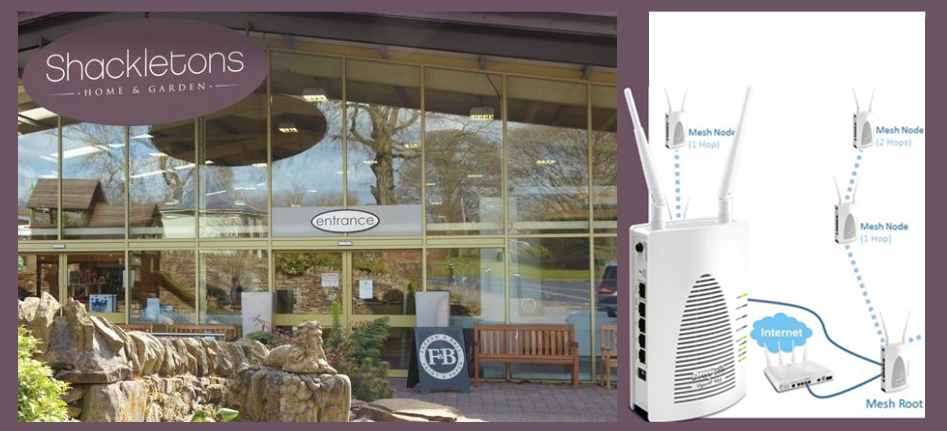
Award-winning Shackletons Home & Garden Centre always challenge themselves to source their high-quality lifestyle products. Exceptional service standards are at the heart of everything. They wanted to offer their customers the opportunity to browse online – both indoors and out.

Tom Elliott at Shackletons explains, ‘We needed a reliable, secure WiFi system to provide a Guest WiFi Network, access for every Electronic Point of Sale EPOS device throughout our stores, as well as a suitable corporate network for our staff.’

A large site like Shackletons Home & Garden needed careful planning to provide suitable coverage throughout. Maximum signal strength for high speeds and device connections in all corners, spaces, cash desks and meeting rooms as required. Device connections on the fringes of the WiFi network always need careful consideration.

Even with many obstacles, it is possible to minimise the need to run new cabling. Large areas are no problem for the mesh wireless systems. Linking two or more access points provides a unified wireless network.

Cirrus IT Services have been a DrayTek partner and authorised reseller with qualified DrayTek Certified Network Administrator accredited engineers and lots of experience deploying solutions. DrayTek’s fantastic innovative and reliable networking products offer both fast and secure WiFi network coverage.

Mesh-based wireless is ideal for both large buildings and outdoor spaces, even when blanket wireless coverage is considered tricky to install. Simply joining mesh nodes eliminates WiFi blind spots and known dead spots to expand the total coverage.

If you would like to ask more about reliable WiFi options, then please do get in touch. Choose Cirrus IT Services for all your tech requirements. From business phone systems to business broadband, business mobiles to fibre-based ultimate connectivity options, cloud-based telephony and connections to contact centre services wherever you are. All services are backed by customer service. The Cirrus IT Services team receives 100% positive feedback from customers.

When virtualisation and a VM backup is right for your business

adult data database 1181316

When reaching a decision that virtualisation is right for your business, you’ve taken lots of factors into account. You’ve looked at desktop computer volumes – laptops and remote working – the amount of storage capacity required – server capacity plans – network infrastructure and bandwidth demands. You’ve weighed up the pros and cons of all the issues. Virtualisation helps lots of businesses save money by optimising systems.

You need to shop around for the right products

Working with many businesses gives us unique insight. Our IT support team keep accurate logs of everyday problems as they occur. We have years of experience about what business managers needed most. We know that virtualisation isn’t limited to large organisations. All businesses of all sizes can benefit.

Products that help create a stable and secure working environment are the products we like best. We use a variety of tried and tested solutions. We look at the technology you already have. We help guide best-fit solutions based on requirements.

Backup operating procedures are critical, whether it’s a full virtual Infrastructure backup or a few files on a laptop. We help guide the best fit solution based on your requirements. When you’re shopping around for the right products, talk to us.

With a single virtualised environment you can perform a backup archive and recover easily and quickly. Reducing all your desktop management stresses saves both time and money. Managing, securing and upgrading centrally, makes it easier to keep your IT systems secure.

We recommend Altaro VM Backup

Altaro VM Backup feature-rich backup solution is seamless backup and restore software for both Hyper-V and VMware-based virtual machines. You can boot from backup with the assurance of the backup integrity. You have control of the rapid restore options. You set the personalised backup plan to suit your infrastructure needs. We also want to emphasise that the Altaro VM Backup affordable price doesn’t mean lack of features. You get deduplication, compression algorithms, offsite backup options and continuous WAN-optimised copies. You get a great backup solution packed with powerful performance and value.

Want to know more?

Please have a chat with us. You can call, email or complete our online contact form at any time.

We also have a dedicated Product Page here: https://www.cirrusits.co.uk/altaro-virtual-machine-backup/

Problem free IT

ProblemFreeIT

Imagine a day of your valuable time fully focussed on the day-to-day running of your business. Would you put worrying about IT issues on your ‘to do’ list?

Adding value to your business is your focus. Reliable, predictable support costs are central to your business planning and cash flow. Guaranteed service level agreements (SLAs) guarantee you get what you pay for.

Comprehensive IT Managed Service & Support makes the difference.

Your staff need responsive, stable, high-performance business technology.

Can your staff work without access to PCs or laptops?

What if data is stolen or confidential information passed to competitors? How much would this cost you?

Would your business cope without an internet connection?

What if something went wrong with emails?

Trustworthy Managed Service Providers monitor your infrastructure and proactively resolve issues to stop the drop in performance or faults. Get problems fixed before you even knew they existed.

Your competitive advantage is essential.

As well as essential best practice in the fast-moving IT environment, your dedicated team of experts are aware of areas that offer a competitive advantage.  You can rely on Managed Services & Support staff being fully current and focussed on IT cloud solutions all day, every day.

Some tech just keeps the lights on. Other tech products and IT applications contribute directly to business success. A Managed Service Provider helps you spend more on the areas that matter most resulting in a better business.

The best road-map guide

Planning changes in your infrastructure with expert help is one of the best ways to ensure your business resilience. You don’t want to pay for over expensive on-premises equipment on your route to success.

Suitable for IT Managers and Business owners alike

IT professionals face more business pressure than ever before as threats to networks emerge daily. Managing IT inefficiencies are stressful enough without preventing data breach and monitoring infrastructure threat. A compliance audit is also high on the priority list since GDPR. Some tools allow you to manage, monitor and secure your network remotely. A state-of-the-art comprehensive security platform collects intelligence across millions of sources to alert issues before they occur. You can get the information presented to you as an actionable list so that you can work smarter.

If you want to see a full guide of all the features, you can read more here:  https://www.cirrusits.co.uk/managed-service-support/  or contact us to discuss your specific business requirements. We look forward to hearing from you  https://www.cirrusits.co.uk/contact-us/

Trouble with your Internet Connection?

design desk display 313690

Having trouble with your internet connection? We know just how frustrating this can be. It happens from time to time. Finding out what’s going on is vital to your business operation. Being able to fix it quickly is even better.

Checks that you can do

Strange as it sounds, start by checking your network connection. Sometimes what might seem like an internet network problem is simply a network connection that’s been unplugged by mistake. Check that any Wi-Fi access points, routers or modems have power. Look for the simple answers first. You never know who has been looking for a spare plug!

You can also check to make sure that your devices are trying to connect to the right access point. Remember that if you change your access point authentication password, you’ll need to update all your devices. Think back to the last time you used your device, laptop, tablet, etc. Has the password changed since then?

And finally, check once and then check again. We regularly get support email requests, only to receive another one a few minutes later says ‘Oops, sorry, my mistake!’

Still no network?

Ok, so you’re sure everything looks right but still no network? It’s finally time look at your Internet connections. And the good news – if you are one of our internet connectivity customers, we have a new handy tool for you to check if there are any network wide issues that could be affecting your services. Use another device like a mobile phone or tablet to visit our status page:

http://status.cirrusits.co.uk/

status 1

The Internet

The next step is to see what your Internet connection looks like. We know people hate to hear this, but – unplug your router or modem, wait for a minute and then plug it back in. If you call us, we’ll have to ask you to do this anyway. Sometimes devices just need to reset themselves and this is the quickest and easiest way to do it. If you’re still not on the net, please log it with us.

Internet running, but still slow?

If your Internet is running, but it’s being slow, you can now run a speedtest that will automatically record the results in your account.

http://speedtest.cirrusits.co.uk

status 2

Please note that this page only works if you have your internet connection through us, if not you will see something like this screen instead:

status 3

At Cirrus ITS the team are always happy to help. You can log a support request with us at any time here:

https://support.cirrusits.co.uk